Hotline
Cross-workspace communication for Claude Code agents.
Your agents finally have a phone. And unlike your last phone upgrade, this one actually comes with useful new features.
Hotline lets one Claude Code workspace call another — ask a question, delegate a task, or collaborate in real-time. No copy-pasting between terminals. No “hey can you check the other project and tell me…” followed by you manually doing the checking. Just agent-to-agent communication, like nature intended.
Installation
# Add the marketplace (if not already added)
claude plugin marketplace add jtsternberg/claude-plugins

# Install the plugin
claude plugin install hotline@jtsternberg
This registers the Hotline skills (hotline-dial, hotline-ringing, hotline-pickup, hotline-add-contact, hotline-whoami, hotline-caller-id, hotline-wiretap, hotline-switchboard, hotline-call-status). Invoke them as /hotline:<skill-name> in Claude Code—for example, /hotline:hotline-dial—or $hotline:<skill-name> in Codex. Bare names are prose identifiers only.
Usage — The Three Call Modes
Hotline supports three ways to communicate with another workspace. Just tell your agent what you need:
Quick Call
“Ask my blog workspace what the site tagline is.”
A quick question that gets a quick answer. One round trip, in and out.
Work Order
“Tell the marketing workspace to draft an about page based on the company info in their repo.”
Delegate a task to another workspace and let it work autonomously. You’ll get a report when it’s done.
Conference Call
“I need you to work with the design workspace on the new landing page — coordinate the component structure and styles.”
Back-and-forth collaboration between workspaces. Multiple exchanges, iterative refinement. If cmux is available, Hotline opens a visible cmux workspace immediately; otherwise it falls back to headless Claude.
Dialing by Session ID
You can also dial a specific Claude Code session directly:
“Dial session 5b1dda91-a3c1-45f9-b967-aa9dac221e59 and ask what branch it’s on.”
Dialing a session ID dials that conversation. Hotline reverse-looks up the transcript to find the workspace, boots the callee there, and resumes the session — so “what went wrong?” reaches a callee that was actually in the room rather than a stranger in the right directory. It forks by default, keeping hotline’s protocol noise out of the original transcript; if you want to contribute to that session instead (“help that session fix its bug”), the agent passes --no-fork and the call lands in their transcript.
A session ID already names its workspace, so there is no flag for “that repo, blank slate” — ask for the workspace instead:
“Dial my-repo and run the test suite.”
Messaging a Session That’s Already Running (native fast path)
Some calls don’t need hotline to launch anything. When you name a Claude Code session
you already have open — “tell my other session the migration finished,” “ask the
session working on the frontend what port it’s on” — and the message is something it
can answer from where it sits, hotline routes through Claude Code’s native
cross-session messaging (ListAgents + SendMessage, Claude Code ≥ 2.1.224) instead
of spinning up a callee. It’s a plain-text summary straight into the live session: no
new surface, no scraping, no wasted launch.
The gate is your wording, not a probe. Naming a workspace or project (“dial monorepo”) always launches, even though sessions in that folder are usually live — hotline’s own callees run there. Anything the target must go read or do is a work order and launches too. Hotline owns everything native can’t: launching a workspace that isn’t running, resolving targets by project name, autonomous work orders, conference calls, and the switchboard. (Claude Code only; under Codex every call uses the launch transport.)
Adding a Workspace to the Directory
Use hotline-add-contact to register a workspace so other agents can find it:
“Add this workspace as ‘blog’”
Or with explicit arguments:
“/hotline:hotline-add-contact blog /Users/me/Code/my-blog”
If dirmap is in PATH, it uses dirmap add. Otherwise, it edits ~/.dirmap.json directly.
Identifying a Workspace
Use hotline-whoami to find out what a workspace is called in dirmap:
“/hotline:hotline-whoami”
Returns the dirmap slug for the current workspace, or suggests registering it if it’s not found.
Workspace Resolution
When you say “call the blog workspace,” Hotline needs to figure out where that workspace actually lives on disk. It uses a layered resolution strategy:
1. dirmap (preferred)
If you have the dirmap CLI tool in your PATH, Hotline uses it directly. Your existing ~/.dirmap.json entries just work — say “call the blog workspace” and Hotline resolves it through dirmap. (That dirmap is part of a larger dotfiles setup, but the concept is dead simple — point your Claude at that file and say “build me a standalone version with add/list/remove in TypeScript/Go/Cobol/cuneiform/etc.” and you’ll have one in minutes.)
2. Bundled Fallback (no dirmap installed)
Hotline includes dirmap-fallback.sh, a minimal reader that supports get <id> and list against ~/.dirmap.json. But you’ll have to create/maintain a ~/.dirmap.json file manually:
{
  "blog": "/Users/you/Code/my-blog",
  "marketing": "/Users/you/Code/marketing-site",
  "api": "/Users/you/Code/backend-api"
}
3. Fuzzy Matching via Cached Identities
Hotline also caches workspace identities (via the hotline-pickup skill) — name, description, and tags for each project. Even if you say “call the React frontend” and there’s no dirmap entry called “react-frontend,” resolution can match against cached identity metadata.
cmux Integration
cmux is an optional but preferred transport for all call modes. When available, Hotline uses it instead of claude -p to avoid consuming programmatic usage credits.
- Auto-detected: Hotline checks for
cmuxavailability automatically — no config needed. - Credit-aware: Interactive
claudesessions (no-pflag) draw from your interactive quota, not the separate Agent SDK credit. When cmux is present, all call modes benefit automatically. - All modes covered: Quick calls and work orders use an async cmux transport that reads the callee’s own transcript JSONL for the ringing skill’s STATUS signals, correlated on the call’s nonce, and falls back to scraping
cmux read-screenonly when the transcript can’t be found. Conference calls use an interactive cmux workspace. Headlessclaude -pis the fallback when cmux isn’t running. - Visible by default: the callee lands in a surface right next to your current pane, so you can observe or take over any call at any time.
cmux gives the remote agent a proper terminal, which is handy when the conversation involves running commands, reviewing output, or doing anything more complex than a Q&A.
Where the call lands (placement)
When a call routes through cmux, Hotline opens the callee side-by-side with your current pane, in the same window — you watch the call happen beside the original conversation. It does this by calling the cmux-cli plugin’s open-side-surface.sh (resolved at runtime — Hotline keeps no copy of the split-vs-adjacent decision tree), which waits for the new surface’s PTY to attach before the prompt is sent, so the callee’s first keystrokes are never dropped. Side-by-side surfaces stay open after the call (they live in your window); the caller closes them when done.
If the tool shell lacks CMUX_* context, cmux-cli can recover the caller from
its exact native agent session, validated against a live ancestor PID and the
surface’s tty in the current tree. Hotline supplies caller identity separately
from the callee’s agent kind. Unprovable or ambiguous callers retain the recorded
surface-context→detached fallback; the focused pane is never borrowed.
A dial never takes your focus, with one exception. Every surface and workspace a call creates is made --focus false, and nothing focuses a pane afterwards: the callee appears beside you and boots there while your cursor stays where it was. That is a correctness rule, not a courtesy — focus moves the input line under your keystrokes, and a stray three characters arriving ahead of the launch command once made a callee’s shell run rkebash /tmp/… and cost the caller its whole 60-second boot budget. Every read Hotline takes of a callee’s screen is scroll-immune for the same reason: you can scroll around inside a callee’s pane while a call is in flight without the caller mistaking your frozen viewport for an idle REPL. The exception is a herdr --mode conference, which focuses the callee’s pane once the prompt is confirmed in its transcript — that session is being handed to you, and by then there is no launch command left for a stray keystroke to break.
If cmux is running but the cmux-cli plugin isn’t installed, side-by-side placement isn’t available, so Hotline falls back to the headless transport for that call (it doesn’t silently drop the callee into a detached tab). --detached and --window don’t need cmux-cli and keep working on cmux regardless.
Two opt-outs, passed as flags on the dial command:
/hotline:hotline-dial --detached dotfiles run the full test suite   # disconnected new-workspace tab
/hotline:hotline-dial --window lindris backend tests, please        # group callees in a specific window (find-or-create)
--detached(alias--new-workspace) puts the callee in its own workspace tab, disconnected from your window and auto-closed once the response is captured. That shape is cmux’s: on herdr, detached and side are the same pane split, and the pane is left live either way.--window <name|ref>lands the callee in a specific window. Awindow:<n>ref targets that window; a bare name reuses the window holding a workspace titled<name>, creating one (window + titled workspace) if none exists — so repeated--window <name>calls group together. (cmux windows aren’t directly nameable, so the titled-workspace acts as the window’s findable label.)
The headless path ignores both flags. herdr honors --placement side and --detached (the same split, as above) and refuses --window.
Every dial names its callee. --label "<2-4 words>" is required, and it says what the callee is doing — fix hotline titles, review pr 2393. It becomes the callee’s session name, which claude publishes as its terminal title and cmux renders live in the tab strip: ◑ hotline: review pr 2393 (work_order), activity glyph and all. Nothing pins a static tab title anywhere, precisely so that glyph survives — a pinned title outranks claude’s own for the life of the tab, and losing the glyph loses how you spot a callee that is stuck. A detached callee’s workspace is named hotline: <label> instead, since it has no tab inside your window. A follow-up ignores the label and keeps the name first contact gave it.
Follow-ups reuse the existing surface. The first call to a workspace opens a surface and leaves it open, holding a live session. A follow-up dial to that same session routes its message into that existing surface instead of opening a new one — so an N-turn conversation stays in one surface rather than stacking N. That holds for a --detached callee too: it lives in one surface inside its own workspace tab, and a follow-up re-addresses that surface while it is live. When the surface can’t take the message — it’s gone (a detached tab that already auto-closed is the common case), its REPL exited, it’s mid-turn, its input box holds unsent text — the follow-up opens a fresh one and names the reason in .fallbacks. A surface a follow-up supersedes is closed once it’s proven idle and proven to be the superseded exchange, so panes don’t accumulate behind a long conversation.
To get a genuinely new callee session, pass --fresh. It reads this caller’s cached session and surface for the resolved target and declines both, so the callee starts new instead of being resumed — the flag for a pipeline phase whose value is a skeptical fresh read rather than a continued conversation. The abandoned session is reported as session-cache→fresh(<session-id>), and --fresh contradicts --resume <id>: pass one or the other.
Every message is delivered the same way: one paste over cmux’s control socket. First contact and follow-ups both write the payload to an owner-only file and hand cmux a single terminal.paste, then confirm the call’s nonce reached the callee — in its transcript, or failing that on its screen. Two consequences worth knowing: the payload never appears in a command line, so ps cannot leak a work order to other local users; and delivery is proven rather than assumed, so a message that did not land is reported instead of silently waited on. A cmux too old to offer terminal.paste is reported as terminal-paste-unavailable→headless and the call runs headless, without a visible pane.
Configuration
Identity Cache TTL
By default, workspace identities (cached by the pickup skill) are considered fresh for 24 hours. You can customize this by adding to your ~/.claude/settings.json:
{
  "env": {
    "HOTLINE_IDENTITY_TTL_HOURS": "48"
  }
}
Set it higher if your workspaces don’t change much, lower if you’re in rapid development across multiple projects.
Delivery timeout (HOTLINE_PASTE_BOX_TIMEOUT)
Before pasting, delivery waits for the callee’s REPL to draw its input box. That
wait defaults to whatever --boot-timeout is for the call (60s on the cmux
transport) — both are waiting for the same event. Override it only to decouple the
two:
{
  "env": {
    "HOTLINE_PASTE_BOX_TIMEOUT": "45"
  }
}
This is a safety gate rather than a patience setting. A payload delivered to a
surface that has not yet exec’d claude does not disappear — it goes to the shell
that is there, and delivery submits with Return, so the shell would run it. When
the box never appears, hotline refuses to deliver and reports
stage: "deliver" with the prompt still on disk.
Skip permission prompts in cmux receivers (opt-in)
When Hotline routes a call through cmux (interactive claude), the receiver runs in an unattended pane. Any permission gate the receiver hits — skill invocation, a Bash command not on --allowedTools, etc. — stalls the call until a human clicks “Yes.” There’s no human watching.
If you want autonomous calls to skip that gate, set:
{
  "env": {
    "HOTLINE_DANGEROUSLY_SKIP_PERMISSIONS": "1"
  }
}
…or export it in your shell rc. Accepts 1 / true / yes (case-insensitive). Adds --dangerously-skip-permissions to the cmux-side claude invocation.
Default is off. This is a real trust decision — bypassing permissions means the receiver can run any tool, including ones you wouldn’t approve interactively. Only enable it if you trust the workspaces you’re dialing into. Headless (claude -p) calls do not need this — non-interactive mode handles permissions without prompting.
It does not cover Claude Code’s startup trust dialog. That gate is repository trust, not a permission mode: no permissions setting bypasses it — not this variable, not claude --dangerously-skip-permissions, not bypassPermissions as the settings default (only -p/--print escapes it, and an interactive callee is not that), so a dial into an untrusted repo parks on the dialog whatever the knob says. Trust attaches to the git repository, not the directory: a worktree or subdirectory of an already-trusted repo dials clean and never gets a trust record of its own, while a fresh git init is a new repo with its own boundary. A directory that is not a git repo at all is not gated. When the target is a repo Claude Code has not trusted, run claude in it once and answer Yes, I trust this folder before dialing into it unattended.
Force headless transport (opt-in)
By default, dial picks cmux when it’s available (free interactive usage) and falls back to headless-call.sh only when cmux isn’t running. Two ways to override:
Per call — pass --headless as a flag in the dial slash command:
/hotline:hotline-dial --headless dotfiles what branch are you on?
The flag is parsed by the dial skill and stripped from the args before workspace resolution. Forces just that one dial through the headless transport.
Always-on — set the env var in ~/.claude/settings.json (or your shell):
{
  "env": {
    "HOTLINE_FORCE_HEADLESS": "1"
  }
}
Accepts 1 / true / yes (case-insensitive). When set, check-cmux.sh always exits 1 and every dial takes the headless path regardless of cmux availability.
Use cases for either path: debugging the headless transport, A/B comparing receiver behavior across modes, or wanting claude -p’s structured stream-json output directly on stdout. Headless calls draw from the programmatic-usage credit; cmux interactive calls don’t — the opt-in default reflects that cost difference.
The herdr transport (opt-in, local or remote)
A third backend, for the one thing neither of the others can do: outlive the window it was launched from. --transport herdr hosts the callee as a named herdr agent in a persistent pane — the herdr server owns the PTY, so a long work order survives a detach, a closed lid, or a dropped SSH session.
/hotline:hotline-dial --herdr dotfiles run the 40-minute migration
# → dial.sh --transport herdr --label "run the 40-minute migration"
It requires herdr on PATH and a reachable server, and it hosts the callee here unless --remote names another box (below). Placement and mode are open: a herdr callee is always a pane split off the caller’s own, which is side-by-side, so --placement side and --detached are the same launch and differ only in the word .placement reports (side when the dial named none, exactly as over cmux). --mode conference works too — same launch, plus a focus once the prompt has landed (herdr agent focus <name>), and .awaiting_response: false because the session is the user’s now. One placement is still refused: --placement window / --window <ref>, because hotline creates no herdr workspaces or tabs and so has no window to place a callee in. --resume <someone-else's-session> is refused for Claude sessions — herdr hosts a Claude callee with the --session-id preset the transcript path depends on, and claude --resume cannot take that preset. With --agent codex, --resume <thread-id> adopts a Codex thread directly.
Three things behave differently from a cmux call, and all three are deliberate:
--agent codex(--codex) makes the callee a Codex agent. Over herdr (local or--remote, with cached follow-ups and adoption of Codex threads through--resume), cmux, or headless (codex exec). Answers come through the callee’s Codex rollout with the same response-wait contract. See the dial skill’s--agent codexsection.- A failed herdr preflight is an error, not a fallback. Asking for herdr is asking for durability; substituting a cmux surface would be a lie the user discovers hours later.
.stageistransportand.recoverynames the fix. - The pane is left open after the response. Persistence is the point, so hotline does not close it the way it closes a detached cmux tab. Teardown is
herdr pane close $(cat <call_dir>/herdr_pane.txt)— orssh <.remote_target> herdr pane close <.remote_pane>for a remote call, both handles being in the emitted JSON for that purpose. - A follow-up re-targets the same named agent, and a failed re-target loses the conversation. Re-dialing the same target sends the next message with
herdr agent prompt <name>, so context continues in one session and one transcript — no surface to resolve, no input box to clear, nothing superseded to close. But if that agent has exited, hotline falls back to a fresh callee that remembers nothing — herdr cannot re-host an existing claude session — and.fallbackssays so outright rather than leaving it to be discovered. Ablockedagent is the one refusal that is not fallen back from: it is live and holds the only copy of the conversation, so a second callee would strand it, and the dial fails (stage: transport) telling the user to clear the gate and re-dial.
--remote <ssh-target> — the callee on another box
/hotline:hotline-dial --remote jt@buildbox lindris run the integration suite
# → dial.sh --transport herdr --placement detached --remote jt@buildbox \
#           --label "run integration suite"
The same transport, one ssh hop away, for work that belongs on that machine: its checkout, its GPU, its network. --remote selects herdr on its own — a cmux surface lives in this machine’s window server and claude -p is a local process, so nothing else can host anywhere but here — and it is detached by nature, so the flag alone is the whole invocation.
herdr’s own --remote cannot do this: it attaches the interactive TUI and rejects every subcommand outright. So hotline drives the ordinary herdr CLI on that box over ssh, against that box’s own local server. Every verb, refusal and proof tier is the local arm’s; the dispatch sits in one place (herdr_cli), which is why the remote half needed no second copy of the launcher, the delivery or the waiter.
Four things the wire adds:
- Preflight asks that box, and gains one question. Reachable non-interactively (
BatchMode, time-boxed), herdr installed there, its server answering there, a pane to split there, andclaudeon that box’s non-login PATH — the last has no local counterpart, becausessh host cmddoes not get the PATH a human sees after logging in.HERDR_ENV=1is deliberately not accepted as proof of a remote server, and the pane override isHOTLINE_HERDR_REMOTE_PANE: a pane id means nothing on another machine. - The answer comes from the remote transcript.
~/.claude/projects/<encoded realpath>/<session>.jsonlon that box — the$HOMEand the realpath both asked of it, never assumed from here — fetched over the same hop into a local mirror and parsed by the unchangedtranscript-extract.sh. That is the whole payoff of a reader that takes a file path:AWAITING_REVIEW, preemption and the exit codes are identical to a local call. - The work order never rides the ssh command line. It is submitted through a fixed remote command that reads stdin, so the payload stays out of the local
psand its only argv exposure is the sub-second one on the box actually running it. Substituting it into the ssh argv would have moved that exposure onto the machine the caller shares with other users. - One authentication per dial, and every hop time-boxed. A shared
ControlMasterconnection covers all of a dial’s processes. That matters most on a tailnet: Tailscale SSH can run in check mode, printing alogin.tailscale.comURL before the real output (filtered out of every read, never parsed as data) and, once the check period lapses, blocking aBatchModehop on a browser it cannot open. Bounded, that surfaces as an error naming the URL instead of a silent half-hour mid-work-order.
Follow-ups behave exactly as local ones do, with one guard: the session cache records which backend and which box a host handle belongs to. surface_ref is an opaque string, so a herdr agent name from another machine is indistinguishable from a local one — re-dialing the workspace without --remote (or with a different box) is therefore refused — stage: "transport", with the cached agent, its box, and the two moves that resolve it: re-dial naming that box to continue the conversation, or --fresh to abandon it and start a new callee here. A quiet fresh callee would be worse than the refusal: the cache write would replace the entry naming the old one, leaving a live agent on the other box with nothing pointing at it. --fresh records what it abandoned, and how to close it, in .fallbacks.
cmux remains the default, and an ambient signal never selects herdr: running inside a herdr pane (HERDR_ENV=1) only makes the option available. Selecting it takes an opt-in — --transport herdr per call, or HOTLINE_TRANSPORT_AUTO=1, which lets HERDR_ENV=1 decide for a dial that names no transport. That variable is guarded on all of: exactly 1, no --transport, not headless, HERDR_ENV=1, and a passing preflight. When the preflight fails it is a degrade to the cmux default with a transport-auto→cmux(...) entry in .fallbacks, not an error — the opposite of the explicit flag, because nothing was asked for. Focus is taken in exactly one case, a conference; every other dial splits --no-focus, since moving the user’s cursor into a booting callee lands their next keystrokes in its REPL. Response extraction is shared, not forked — herdr agent wait replaces the screen poll as the when to read gate, and the same transcript-extract.sh nonce/STATUS reader produces the answer, so AWAITING_REVIEW, a turn ending on STATUS: BLOCKED (exit 7, the callee’s question as the response), and preemption behave exactly as they do over cmux. The lifecycle does add two outcomes the screen poll cannot report: a callee that settles blocked with no STATUS for the nonce is waiting on a human — a permission gate or a question — and the wait says so (exit 5, resumable) instead of spending its whole budget and calling it a timeout; and a callee that settles idle/done with no STATUS whose turn ended — on an API-error row confirmed by two settled reads, or after HOTLINE_STALL_SECONDS (default 600) with neither its transcript nor, locally, its subagents’ transcripts growing — gets exit 6 (resumable; resume with a follow-up dial). A --remote call sees only the main transcript, so a remote callee waiting on its own subagents can still hit the quiet window. First contact is gated harder than a follow-up: before the opening payload goes out, delivery settles and then re-reads agent get until herdr reports the agent interactive_ready and not blocked — a launch-time readiness claim is not a submit-time one, and a payload submitted into a startup trust prompt answers the dialog and vanishes rather than becoming a turn. It also gets a larger confirmation budget, because first contact waits on the callee’s transcript being created rather than appended. Both refusals are pre-submit (sent:false), so a re-dial is safe. A callee’s pane is a sibling split of the anchor by default; HOTLINE_HERDR_PLACEMENT=tab|workspace gives it its own tab instead, optionally inside a group workspace named by HOTLINE_HERDR_WORKSPACE, which is what keeps a run that dials a dozen callees off one pane from producing a single tab of unreachable slivers. The callee’s tab carries --label’s subject behind the call nonce, and its pane’s terminal title carries the session name hotline: <label> (<mode>); HOTLINE_HERDR_TAB_LABEL overrides the tab label verbatim. Tuning knobs: HOTLINE_HERDR_PANE, HOTLINE_HERDR_PLACEMENT, HOTLINE_HERDR_WORKSPACE, HOTLINE_HERDR_TAB_LABEL, HOTLINE_HERDR_SPLIT_DIRECTION, HOTLINE_HERDR_PANE_SETTLE, HOTLINE_HERDR_START_BUDGET, HOTLINE_HERDR_READY_POLL, HOTLINE_HERDR_START_ATTEMPTS, HOTLINE_HERDR_FIRST_SETTLE, HOTLINE_HERDR_READY_TRIES, HOTLINE_HERDR_FIRST_CONFIRM_TRIES, HOTLINE_HERDR_WAIT_SLICE_MS, HOTLINE_STALL_SECONDS, HOTLINE_HERDR_STALL_SETTLE, HOTLINE_HERDR_KEEP_FAILED_PANE, and for --remote: HOTLINE_HERDR_REMOTE_PANE, HOTLINE_REMOTE_SSH_TIMEOUT, HOTLINE_REMOTE_SSH_PERSIST, HOTLINE_REMOTE_SSH_CONNECT_TIMEOUT.
How It Works
The Complete Flow
┌─────────────────────────────────────────────────────────────────────┐
│  WORKSPACE A (Caller)                                               │
│                                                                     │
│  User: "Dial the blog workspace and ask what the tagline is"        │
│                          │                                          │
│                          ▼                                          │
│                 ┌─────────────────┐                                 │
│                 │  hotline-dial   │  (SKILL.md loaded)              │
│                 │    skill        │                                 │
│                 └────────┬────────┘                                 │
│                          │  ONE command                             │
│                 ┌────────▼────────┐                                 │
│                 │    dial.sh      │  emits ONE JSON payload         │
│                 └────────┬────────┘                                 │
│                          │                                          │
│            ┌─────────────┼──────────────┐                           │
│            ▼             ▼              ▼                           │
│    ┌──────────────┐ ┌──────────┐ ┌────────────┐                    │
│    │ session-     │ │ resolve- │ │ session-   │                    │
│    │ init.sh      │ │workspace │ │ cache.sh   │                    │
│    │              │ │ .sh      │ │            │                    │
│    │ "Who am I?"  │ │ "Where?" │ │ "Talked    │                    │
│    │              │ │          │ │  before?"  │                    │
│    └──────┬───────┘ └────┬─────┘ └─────┬──────┘                    │
│           │              │             │                            │
│           │   ┌──────────┘             │                            │
│           │   │  Uses:                 │                            │
│           │   │  • dirmap get/list     │                            │
│           │   │  • identity-cache.sh   │                            │
│           │   │  • ~/.agents-hotline/  │                            │
│           ▼   ▼                        ▼                            │
│    MY_SESSION_ID    TARGET_PATH    EXISTING_SESSION?                │
│                          │                                          │
│                          ▼                                          │
│                 ┌─────────────────────────────┐                     │
│                 │ Transport select (per mode) │                     │
│                 │                             │                     │
│                 │ --transport herdr?      ─►  │  herdr-call-async.sh│
│                 │ cmux available?             │                     │
│                 │  ├─ quick / work order ──►  │  cmux-call-async.sh │
│                 │  └─ conference call    ──►  │  cmux-call.sh       │
│                 │ cmux unavailable        ─►  │  headless-call*.sh  │
│                 └─────────────┬───────────────┘                     │
│                               │                                     │
└───────────────────────────────┼─────────────────────────────────────┘
                                │
              Either way, the launcher starts a BARE claude —
              no payload on its command line. The message waits
              in $CALL_DIR/pending_paste.md (0600) and is
              delivered after the boot wait as ONE
              terminal.paste over cmux's control socket, then
              confirmed by the call's CALL_ID nonce.

              First contact (no --resume) delivers:
                "/hotline:hotline-ringing [MODE: ...] \
                  [CALLER: ...] [SESSION: ...] \
                  <the actual prompt>"

              Follow-up (existing session) delivers:
                "/hotline:hotline-ringing [FOLLOW_UP] \
                  [MODE: ...] [CALLER: ...] [SESSION: ...] \
                  <the actual prompt>"
              into the surface that session already lives
              in, so the message lands in command-args
              rather than as pasted text the callee won't
              act on. Only when that surface refuses before
              anything is sent do we open a fresh one and
              --resume into it. Headless follow-ups send
              the raw message to `claude -p --resume`.
                                │
┌──────────────────────────┼──────────────────────────────────────────┐
│  WORKSPACE B (Receiver)  ▼                                          │
│                                                                     │
│                 ┌─────────────────┐                                 │
│                 │ hotline-ringing │  (SKILL.md loaded via           │
│                 │    skill        │   /hotline:hotline-ringing in prompt)   │
│                 └────────┬────────┘                                 │
│                          │                                          │
│            Parses: MODE, CALLER, SESSION                            │
│            from the prompt metadata                                 │
│                          │                                          │
│                          ▼                                          │
│            ┌─────────────────────────┐                              │
│            │  Agent B does the work  │                              │
│            │  (reads files, answers  │                              │
│            │   questions, makes      │                              │
│            │   changes, etc.)        │                              │
│            └─────────────┬───────────┘                              │
│                          │                                          │
│            (no logging step — Workspace A logs the call;            │
│             dial-history.sh lives in A's plugin dir, which          │
│             B's workspace-isolation rule forbids touching)          │
│                          │                                          │
│            Response + STATUS signal                                 │
│            (DONE / WORK_COMPLETE / WORK_IN_PROGRESS /               │
│             AWAITING_REVIEW / OUT_OF_SCOPE)                          │
│            + optional HOTLINE_NOTE for protocol issues               │
│                          │                                          │
└──────────────────────────┼──────────────────────────────────────────┘
                           │
                           │  JSON response with session_id
                           │
┌──────────────────────────┼──────────────────────────────────────────┐
│  WORKSPACE A (back)      ▼                                          │
│                                                                     │
│            ┌──────────────────────────────┐                         │
│            │  register-call.sh            │                         │
│            │   ├─ session-cache.sh set    │  (caches for reuse)     │
│            │   └─ dial-history.sh append  │  (logs the call)        │
│            └─────────────┬────────────────┘                         │
│                          │                                          │
│                          ▼                                          │
│  Agent A reports to user:                                           │
│  "Connected to blog (session: abc123).                              │
│   Their response: [answer]"                                         │
│                                                                     │
└─────────────────────────────────────────────────────────────────────┘
The dial wrapper
skills/dial/scripts/dial.sh is the single entry point for everything in that
first box. It composes the scripts below it — it modifies none of them — and
emits one JSON object:
dial.sh --target "<the user's words>" --mode work_order \
        --label "<2-4 word slug of the task>" --prompt-file /tmp/msg.txt
.status |
exit | Meaning |
|---|---|---|
connected |
0 | The callee is up; .remote_session_id / .call_dir / .surface_ref describe the call |
replay |
2 | Legacy fallback only — identity needs one more pass; run the identical command again |
needs_disambiguation |
3 | .candidates holds the matches; ask the user, re-run with a path |
error |
1 | .stage + .detail + .recovery |
Every degradation it absorbs rather than handing back as a decision lands in a
fallbacks array: transport re-fires to headless (no cmux, no cmux-cli, no
python3, an unreachable control socket, a cmux that doesn’t offer
terminal.paste), placement dropping from side-by-side to a detached tab, a
refused surface reuse falling through to a fresh surface, closing the surface a
follow-up superseded, and an identity refresh. skills/dial/SKILL.md carries the
full table of entries and what each one means for the caller.
wait-for-response.sh stays outside the wrapper on purpose — a work order can
outlast a tool-call timeout, and the caller has to report the connection to the
user in between boot and response.
Session identity (the “Know Thyself” step)
Identity resolves inline, in the same dial.sh invocation as the rest of the
call. Claude Code exports $CLAUDE_CODE_SESSION_ID into every Bash subprocess
(2.1.132 and up) and that value is the resumable session ID, so
session-init.sh validates it as a UUID and returns. Codex callers land on
$CODEX_THREAD_ID the same way.
session-init.sh
      │
      ├── $HOTLINE_CALLER_SESSION_ID set? ──────► caller_kind "override" ──► done
      │
      ├── $CLAUDE_CODE_SESSION_ID valid UUID? ──► caller_kind "native"   ──► done
      │        (Claude Code >= 2.1.132 — the normal path, one call)
      │
      ├── $CODEX_THREAD_ID set? ────────────────► caller_kind "codex"    ──► done
      │
      └── LEGACY FALLBACK (pre-2.1.132 Claude, or a stripped environment)
                │
                ▼
          session-fingerprint.sh ──► Cache hit? ──YES──► session ID (exit 0)
                │
                NO (exit 1) ──► stderr: SESSION_FINGERPRINT_<uuid>
                │
                │  (the fingerprint reaches the transcript only *after*
                │   this tool call returns — hence a second call)
                │
                ▼  [SEPARATE TOOL CALL]
          session-init.sh discover <fingerprint>
                │
                ▼
          session-discover.sh greps recent .jsonl transcripts
          (3 retries, 1s apart, for the async flush; then the 10
           most recent project dirs) ──► Cache to /tmp, return ID
dial.sh drives that fallback itself: on a legacy cache miss it plants the
fingerprint, persists it keyed by the claude PID, and returns
{"status":"replay"} so an identical re-run completes the call. The two-tool-call
shape is unavoidable there, but it’s the only path that produces a replay, and
nothing outside the wrapper has to know about it.
Workspace Resolution
resolve-workspace.sh "<user's words>"
      │
      ├── Starts with / or ~ ? ──► Validate path exists ──► Done
      │
      ├── Contains / ? ──► Try $PWD/<ref> (relative path) ──► Done
      │
      ├── Looks like a UUID? ──► Session cache ──► Transcript reverse lookup ──► Done
      │
      ├── dirmap get "<ref>" ──► Exact match? ──► Done
      │
      └── dirmap list --json ──► Enrich with identity caches
              │                   from ~/.agents-hotline/identities/
              ▼
          Candidates JSON on stderr (exit 1)
          Agent picks the best match or asks user
The Skills
hotline-dial— The caller side. Onedial.shinvocation runs the whole flow above (identity, resolve, transport, launch, boot wait) and returns one JSON payload; the skill supplies the judgment — which workspace, which mode, fork-vs-assist — and relays the response. Forks by default when dialing someone else’s session ID.hotline-ringing— The receiver-side handshake. Loaded via the/hotline:hotline-ringingprefix in the prompt. Tells Agent B what’s happening, how to respond, and how to signal completion. Enforces workspace isolation.hotline-pickup— Workspace identity introspection. Runsgather-workspace-info.shto examine CLAUDE.md, package files, git history, then caches a concise identity to~/.agents-hotline/identities/. Used by workspace resolution for fuzzy matching.hotline-add-contact— Register a workspace in dirmap so other agents can find it. Usesdirmap addif available, edits~/.dirmap.jsondirectly otherwise.hotline-whoami— Reverse-lookup the current workspace’s dirmap slug. Caller ID for the hotline.hotline-wiretap— Locate the current session’s JSONL transcript file, derived from the native session ID (fingerprint discovery on legacy clients).hotline-switchboard— Live, read-only HTML dashboard of all hotline calls. See below.hotline-call-status— Print the call registry as JSON lines: which caller session dialed which callee session, into which workspace, on which transport and host handle. Read-only, and shares its registry reader with the switchboard server so the two never disagree. For orchestration views that need to nest callees under their caller.
State
All hotline state lives in ~/.agents-hotline/:
identities/— Cached workspace identity JSON filesidentities/*.dial_history.jsonl— Append-only call logs per workspace (“who called this workspace”), keyed by sha256 of the receiver’s cwd, written by the caller’sregister-call.sh. One compact JSON object per line; capped at 100 entries.dial-history.sh normalizerepairs a legacy pretty-printed or half-trimmed file in place (appenddoes it automatically)sessions/— Outgoing session maps (keyed by caller session ID)pending/— In-flightdial.shidentity fingerprints, keyed by claude PID. Legacy-fallback state only — stays empty on the native path. Written on areplay, removed the moment discovery succeeds; entries older thanHOTLINE_PENDING_TTL(default 600s) are discarded as leftovers, since a recycled PID would otherwise inherit a dead session’s fingerprintswitchboard.pid/switchboard.log— Switchboard server state
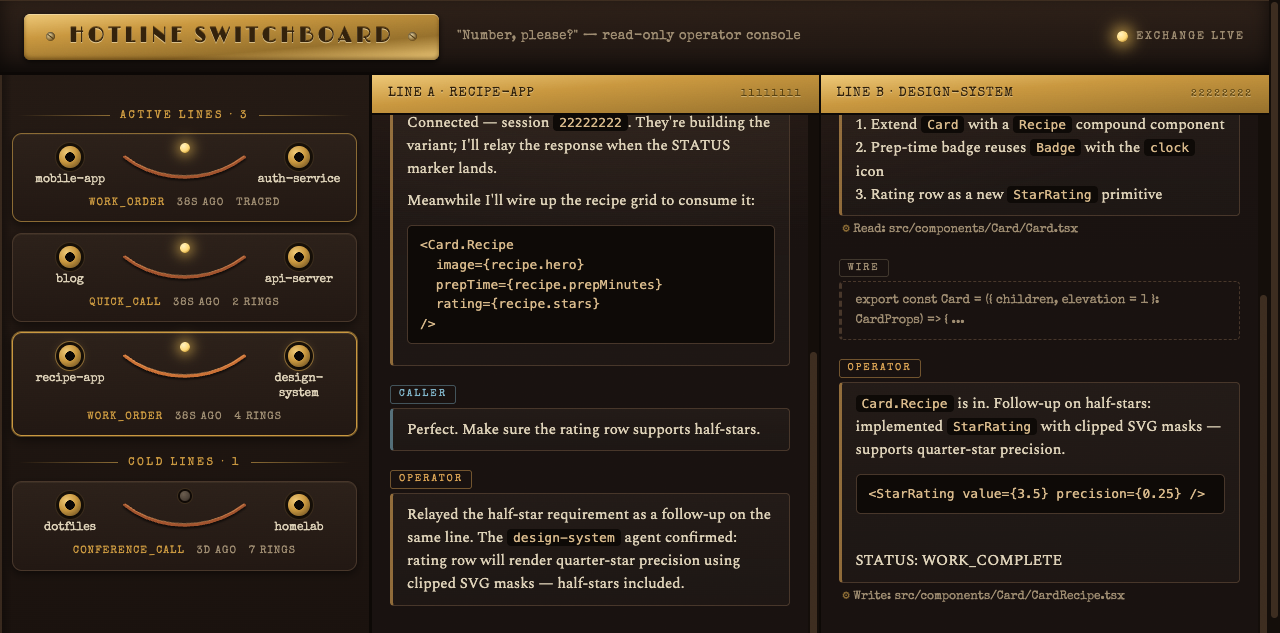
The Switchboard
A live, read-only dashboard of every hotline conversation — ask Claude to “open the switchboard” (or run the script directly):
bash plugins/hotline/skills/switchboard/scripts/switchboard.sh start   # opens the browser
bash plugins/hotline/skills/switchboard/scripts/switchboard.sh stop
bash plugins/hotline/skills/switchboard/scripts/switchboard.sh status
What you get:
- Call board — every call from the sessions registry, grouped live (activity < 15 min), recent (< 24h), and stale, with mode, age, and exchange count.
- Both ends of the line — click a call to see the caller and callee transcripts rendered side-by-side.
- Real-time — the server tails the Claude Code transcript JSONL files (
~/.claude/projects/*/<session-id>.jsonl) from byte offsets and streams new entries to the browser over SSE as the conversations evolve. Unlikeclaude --resume, the view stays current. - Discovery scan — calls the registry never recorded are reconstructed from the ringing handshake at the top of each callee transcript (
/hotline:hotline-ringing [MODE:…] [CALLER:…] [SESSION:…]) and shown with atracedstamp. Registry entries win on conflicts.
Registration is script-level on the dial side: wait-for-session.sh records each call in the sessions registry the moment the remote session ID is known, so calls appear on the board without relying on the dialing agent to cache them.
Zero dependencies: a single-file Node server with an inline UI — no npm install, no build step. It never writes to the registry or transcripts. Default port 4160 (--port=<n> or HOTLINE_SWITCHBOARD_PORT to change).
Roadmap
Hybrid Protocol
Per-mode transport selection — using the best tool for each call type rather than defaulting to headless-with-optional-cmux-escalation. Think: different transport backends optimized for quick calls vs. deep collaboration.
Non-Claude Agent Support
You may have noticed the state directory is ~/.agents-hotline/, not ~/.claude-hotline/. That naming was deliberate. The long-term vision is cross-agent communication — not just Claude-to-Claude, but any agent that speaks the protocol. Claude just happens to be the first tenant.
Bonus: Session ID Discovery
A running agent can read its own session ID from $CLAUDE_CODE_SESSION_ID — Claude Code exports it into every Bash subprocess as of 2.1.132, closing a gap the community had asked about in anthropics/claude-code#25642 and friends. Hotline uses it directly.
Hotline also still ships the fingerprint-and-grep discovery it was built on, as a standalone utility and as the fallback for clients older than 2.1.132 (or environments where the variable never arrives).
Full docs and usage: SESSION-ID-DISCOVERY.md
Selecting a Codex account
Set HOTLINE_CODEX_HOME to the account’s existing absolute Codex home and dial
with --agent codex --transport cmux, or --agent codex --fresh plus
HOTLINE_HERDR_PLACEMENT=tab (or workspace with HOTLINE_HERDR_WORKSPACE).
Explicit thread resume also works over local cmux and herdr tab/workspace.
The tab receives CODEX_HOME before Codex starts; cmux exports it in its launch script;
HOTLINE_CALLEE_ENV only configures tool subprocesses and cannot select the
process account. The home is canonicalized and stored as codex_home.txt in the
call directory for rollout discovery and independent response waiters.
When a thread-id lookup misses the default account, hotline searches local
$HOME/.codex*/sessions directories unless an explicit home was selected.
A unique matching account is selected and reported in .fallbacks; multiple
accounts are refused with their paths. Automatic selection defaults unset herdr
placement to tab. Local resume launches require lsof to check that no live
Codex process already owns that rollout; an existing owner is refused with its
PID before delivery. Close that pane/surface before retrying. Headless resume
and explicit account selection over headless/remote remain unsupported.
A cached continuation to the same target/caller uses --agent codex without
--fresh. Supply the same home or omit the override: the cache retains its
selected account regardless of ambient CODEX_HOME. Follow-up call directories
copy codex_home.txt, codex_rollout.txt and host metadata. Reuse validates the
pinned rollout and live Codex pane before delivery. Herdr may omit its thread
field; local lsof must show one foreground Codex process holding exactly
that rollout even when a matching thread is reported; missing or ambiguous
ownership refuses reuse. Explicit home
mismatches, inconsistent/missing metadata and dead selected-account agents fail
closed. Recover with a new explicit-home --fresh call. Legacy unpinned Codex
calls retain their existing dead-agent resume behavior.
Ownership verification matches descriptor device/inode to the current regular
rollout file and checks process birth identity and the live pane around that
observation. Framed lsof evidence must be complete; replaced files and any
unresolved, deleted or additional rollout records refuse before input delivery.
Fresh startup and first-contact readiness share one absolute boot deadline.
Herdr’s Codex integration reports
session identity from a SessionStart hook over its local socket. Codex’s
--disable hooks disables that reporting too, so an absent agent_session is
expected on this path. Hotline does not install or enable hooks to repair it.
Selected-account continuation supports that runtime by requiring the live
kind/name/pane, intact home/thread metadata and session header, and unique
foreground process ownership of the exact pinned rollout. A PID alone never
proves identity. Missing ownership evidence refuses before input delivery.
Operators needing Herdr’s hook-based session reporting/native restore must
separately review its integration and configured hooks in the selected
CODEX_HOME, including any shared hooks.json symlink, and resolve real Codex
trust decisions themselves. Enabling hooks or reporting a matching thread never
waives Hotline’s rollout-ownership verification.
An explicit home refuses herdr split launches, remote calls, headless and
non-Codex agents. An empty, relative, missing or inaccessible home is
an error. New calls without an override preserve the existing defaults.
For both Claude Code and Codex callers, run the bundled dial.sh with the same
options; no credential contents need to be read or forwarded.
When reporting to another Codex agent through codex queue, start every message
with the sender’s name or role, for example [Hotline builder] Tested contract
ready; no live smoke started. Use the same prefix for checkpoints, completion
reports, blockers and callbacks. Queue acceptance does not prove delivery or
that the receiver acted on the message.
Codex startup readiness uses bounded read-only observations of the same callee. It waits for two current composer/ready snapshots, without retrying agent start or typing into a gate. Isolated older gate headings above the composer are stale evidence; a complete trust-choice UI remains a refusal. Unknown or unreadable startup state times out without asserting that a human trust decision is needed.